
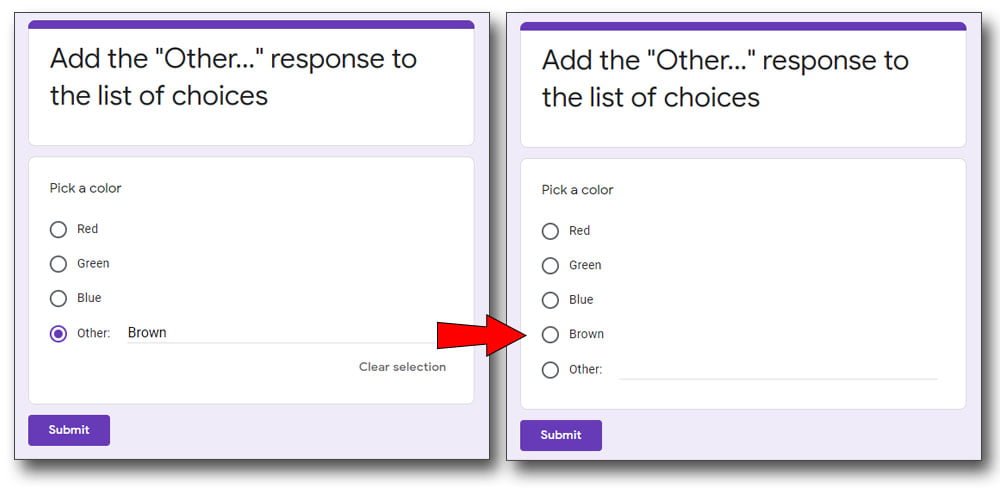
Whit this Google Form Script you can Automatically Add the “Other:” response from the multiple-choice question or checkbox question to the list of choices for the next user.
There is a plugin for that, but this way you can just paste the script in your Google Form and it will automatically work for you by adding “Other” responses into the list of choices.
So, when a user submits an answer under the “Other:” option from a multiple-choice or checkbox question, that answer is:
- automatically added to the list of choices, and
- it will be automatically available to the next user
How to implement
The implementation is very easy, maybe easier than installing a plugin. So, all you have to do is:
- open the Script editor from the Google Form
- paste the script there
- and just run it once
Here are the detailed instructions:
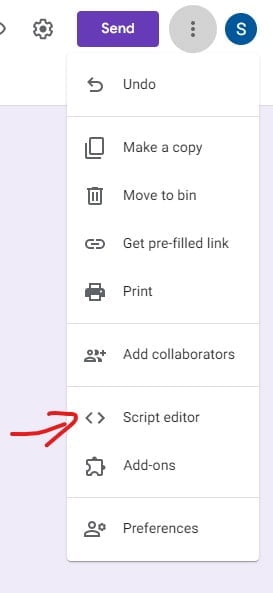
1. Open the script editor from the three-dot menu on the top right part of the screen.
2. Paste the following script into the editor, first delete everything there.
function firstRun(){
  ScriptApp.newTrigger('onFormSubmit')
  .forForm(FormApp.getActiveForm())
  .onFormSubmit()
  .create();
}
//Check for "Other..." in Form submission and
//add them to the multiple choice or checkbox questions
function onFormSubmit() {
  //Get the active Form
  var form = FormApp.getActiveForm();
  //Get the latest Form response
  var formResponses = form.getResponses();
  var formResponse = formResponses[formResponses.length - 1];
  var itemResponses = formResponse.getItemResponses();
  //get all the Multiple-choice questions
  var mc = form.getItems(FormApp.ItemType.MULTIPLE_CHOICE);
  //get all the Checkbox questions
  var cb = form.getItems(FormApp.ItemType.CHECKBOX);
  //Go through the latest response
  for (var j = 0; j < itemResponses.length; j++) {
    var item = itemResponses[j];
    //Go through all the multiple choice questions
    for (var i = 0; i < mc.length; i++)
      //check for the same multiple choice question title
      if (mc[i].getTitle() == item.getItem().getTitle()) {
        //get the available choices from the question
        var multi = mc[i].asMultipleChoiceItem();
        var mValues = multi.getChoices();
        var mArray = [];
        //set hit to false
        var mHit = false;
        //go through the multiple choice question values
        //and compare with the response value
        for (var y = 0; y < mValues.length; y++) {
          //also, add the values to array
          mArray[y] = mValues[y].getValue();
          if (mArray[y] == item.getResponse()) {
            //if value is found
            //set hit to true
            mHit = true;
          }
        }
        //if hit is false (submitted value is not in the question values)
        if (!mHit) {
          //add the submited value to the question values array
          mArray.push(item.getResponse());
          //add that array to the multiple choice question
          multi.setChoiceValues(mArray);
        }
      }
    //Go through all the checkbox questions
    for (var i = 0; i < cb.length; i++)
      //check for the same checkbox question title
      if (cb[i].getTitle() == item.getItem().getTitle()) {
        //get the available choices from the question
        var cBox = cb[i].asCheckboxItem();
        var cValues = cBox.getChoices();
        var cArray = [];
        //set hit to false
        var cHit = false;
        var cBoxResponses = item.getResponse();
        //go through the checkbox question values
        //and compare with the response value
        for (var y = 0; y < cValues.length; y++) {
          //also, add the values to array
          cArray[y] = cValues[y].getValue();
          //the checkbox response is an array, so we must check for values inside
          for (var x = 0; x < cBoxResponses.length; x++) {
            if (cArray[y] == cBoxResponses[x]) {
              //if value is found
              //set hit to true
              cHit = true;
              //remove that value from the response
              cBoxResponses.splice(x, 1);
              //in case there are more answers in the response
              //set hit to false
              if (cBoxResponses.length > 0) cHit = false;
            }
          }
        }
        //if hit is false (submitted value is not in the question values)
        if (!cHit) {
          //add the submitted value to the question values array
          cArray.push(cBoxResponses[0]);
          //add that array to the checkbox question
          cBox.setChoiceValues(cArray);
        }
      }
  }
}
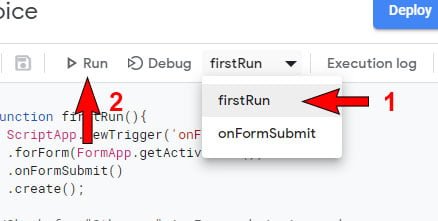
3. Select the “firstRun” function, from the function list, and run it
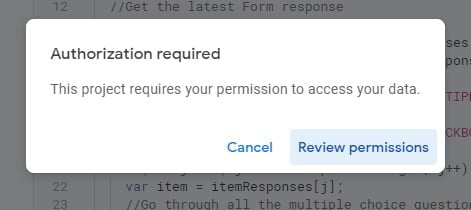
4. Google Form script will inform you that authorization is required, so click on Review permissions and follow the onscreen instructions. If you get stuck, you can follow this guide: Google Script Authorization: Review and Accept the Permission Guide.
That’s it. Now go back to your form and test it, the script will work with Multiple choice questions and with Checkbox questions.